Rock Paper Scissors logo
  • Shop

    • All Art Prints
    • New
    • Best Sellers
    • Staff Favorites

    Orientation

    • Portrait
    • Landscape
    • Square

    Color

    • Black & White
    • Pink
    • Red
    • Orange
    • Yellow
    • Green
    • Blue
    • Purple
    • Neutrals

    Palette

    • Bold & Bright
    • Jewel Tones
    • Pastels
    • Sunset
    View All

    Staff Favorites

    • A circle of tigers | Japanese woodblock wall art | Asian animal art | Large cats painting | Naive drawing | Animal fine art print (whitespace trimmed)

      A circle of tigers | Japanese woodblock wall art | Asian animal art | Large cats painting | Naive drawing | Animal fine art print

      Rock Paper Scissors

      €10.95EUR

    • Pink Sky and Birds Art Print by Watanabe Seitei

      Pink Sky and Birds Art Print by Watanabe Seitei

      Rock Paper Scissors

      €10.95EUR

    • Ecstasy by Samuel Jessrun de Mesquita art print

      Ecstasy by Samuel Jessrun de Mesquita

      Samuel Jessrun de Mesquita

      €10.95EUR

    Shop All
    • View All Artists
    • A-E
    • F-L
    • M-R
    • S-Z

    Browse artists

    • Henri Matisse - ♥
      Henri Matisse
    • William Morris
      William Morris
    • Vincent Van Gogh
      Vincent Van Gogh
    • Wassily Kandinsky
      Wassily Kandinsky
    • Edvard Munch
      Edvard Munch
    • Egon Schiele
      Egon Schiele
    • Ogawa Kazumasa - ♥
      Ogawa Kazumasa
    • Amedeo Modigliani – Christina Digital Download
      Amedeo Modigliani

    Editor's picks

    • Henri Matisse->
    • William Morris->
    • Vincent Van Gogh->
    • Wassily Kandinsky->
    • Edvard Munch->
    • Egon Schiele->

    More artists

    • Ogawa Kazumasa->
    • Amedeo Modigliani->
    • Dorothea Lange->
    • Adolphe Millot->
    • Anna Atkins->
    • Claude Monet->
    View All Artists
    • All subjects
    • Print at Home Wall Art
    • Vintage Astrologoy hand chart | Astro-phrenology art | Retro human hand illustration | Modern Vintage Décor | Eco-friendly gift (whitespace trimmed)
      Anatomical Plates & Medical Illustrations
    • Vintage anatomical illustration | Human & horse anatomy | Antique bones | Skeleton wall art | Veterinarian and doctor gift
      Animal Skeletons & Comparative Anatomy
    • Animals
      Animals
    • Art Nouveau
      Art Nouveau
    • Vintage Astrologoy hand chart | Astro-phrenology art | Retro human hand illustration | Modern Vintage Décor | Eco-friendly gift (whitespace trimmed)
      Astrology & the Zodiac
    • Eclipse of the moon lithograph | Celestial chart of moon phases in solar system | Antique moon and sun wall art | Modern Vintage decor
      Astronomy
    • Bauhaus Yellow Circle With Lines art print
      Bauhaus
    • Birds
      Birds
    • Cats
      Cats
    • Woman kissing the moon | Vintage love and Valentine | Antique man in the moon | Celestial wall art | Old Dixie moon | Modern Vintage decor (whitespace trimmed)
      Celestial, Astrology & Moon Art
    • Colorful fairy tale fine art print • Reaching for the moon and stars • Art Deco sun, sea, fish • Whimsical art • Magic fairy (whitespace trimmed)
      Children's Wall Art
    • Magic forest art print | Here we are in the Christmas Tree Forest | Vintage holiday | Christmas woodland | Fantasy wall art | Dutch artist (whitespace trimmed)
      Christmas
    • Vintage French color chart | Color wheel art print | Chevreul chromatic circle | Primary colors wall art | Antique design &  color theory (whitespace trimmed)
      Color Theory & Color Charts
    • See all
    Print at Home Wall Art

    Featured

    Print at Home Wall Art

  • Reviews
  • Journal
Sign inFavorites

Resources

  • The Journal
  • Digital Download Guides
  • Wholesale Guides
  • Framing & Hanging Tips

Partner with Us

  • Wholesale
  • Shop Rock Paper Scissors on Faire
  • Affiliate Program

Customer Care

  • Contact Us
  • Help Center
  • Payments, Shipping & Returns
  • Policies

Company

  • About Us
  • Reviews
Follow on Shop

Accepted payment methods

© 2023-2026 Rock Paper Scissors·Refund policy·Privacy policy·Terms of service·Shipping policy·Contact information·Your Privacy Options
  • American Express
  • Apple Pay
  • BCBancontact
  • Diners Club
  • Discover
  • Google Pay
  • IDiDEAL
  • JCB
  • MMaestro
  • Mastercard
  • PayPal
  • Shop Pay
  • UPUnionPay
  • Visa
    1. Home
    2. Digital Download Guides
    • The Journal
    • Art & Artists
    • Style & Design
    • Digital Download Guides
    • Wholesale & Trade

    Digital Download Guides / September 22, 2026

    How to Check a Printable Art File Before You Print It

    By Rock Paper Scissors

    Check your printable art file, finished size, aspect ratio, pixel dimensions and crop settings before sending it to a printer or print shop.

    The RPS Wyoming map print is inspected with a loupe, ruler and crop marks before printing.
    Article guide

    In this article

    1. Printable art preflight at a glance
    2. 1. Choose the file from the actual package
    3. 2. Write down the finished output size
    4. 3. Match the aspect ratio
    5. 4. Check pixels at the intended size
    6. 5. Review fit, fill, and crop
    7. 6. Send the selected original file
    8. 7. Give the printer a complete handoff

    Keep exploring

    A purchase checklist beside RPS French fashion, Bill Traylor and Wyoming map art prints.

    Digital Download Guides

    What to Look for When Purchasing Print-at-Home Wall Art

    Check included sizes, pixel dimensions, file formats, use terms and printing fit before buying printable wall art. Includes a practical buyer checklist.

    Read the story
    Prepared digital download package shown beside a single public-domain source file

    Digital Download Guides

    Why Buy Our Digital Downloads When the Original Artwork Is Free Online?

    Museum sources may offer an artwork file for free. Learn what a prepared digital download adds: useful print sizes, careful cropping, organized files, and support.

    Read the story
  • Final one-minute check
  • The short answer: before printing, confirm the exact file you selected, the intended output size, the aspect ratio, the pixel dimensions at that size, and whether the printer is set to preserve or crop the image. These checks help catch a wrong size, an unsuitable source file, or an unexpected crop before you commit paper and ink.

    Do not assume every digital-download package contains the same files. Start with the included-file section on the product you purchased, then use the seven checks below.

    Printable art preflight at a glance

    Check Pass Stop and fix
    File The filename or package note matches the ratio and orientation you need You are using a thumbnail, preview, or a different ratio
    Output size The finished width and height are written down You know only the outside frame size
    Aspect ratio The file and visible frame opening have the same proportions The printer preview removes important artwork
    Pixels The file has enough pixel dimensions for the intended output and service requirements You are enlarging a small web preview
    Print setting You reviewed fit, fill, scale, and orientation The software is making an automatic crop you did not choose
    Handoff The printer received the original selected file and clear instructions The file was compressed through a messaging app or screenshot
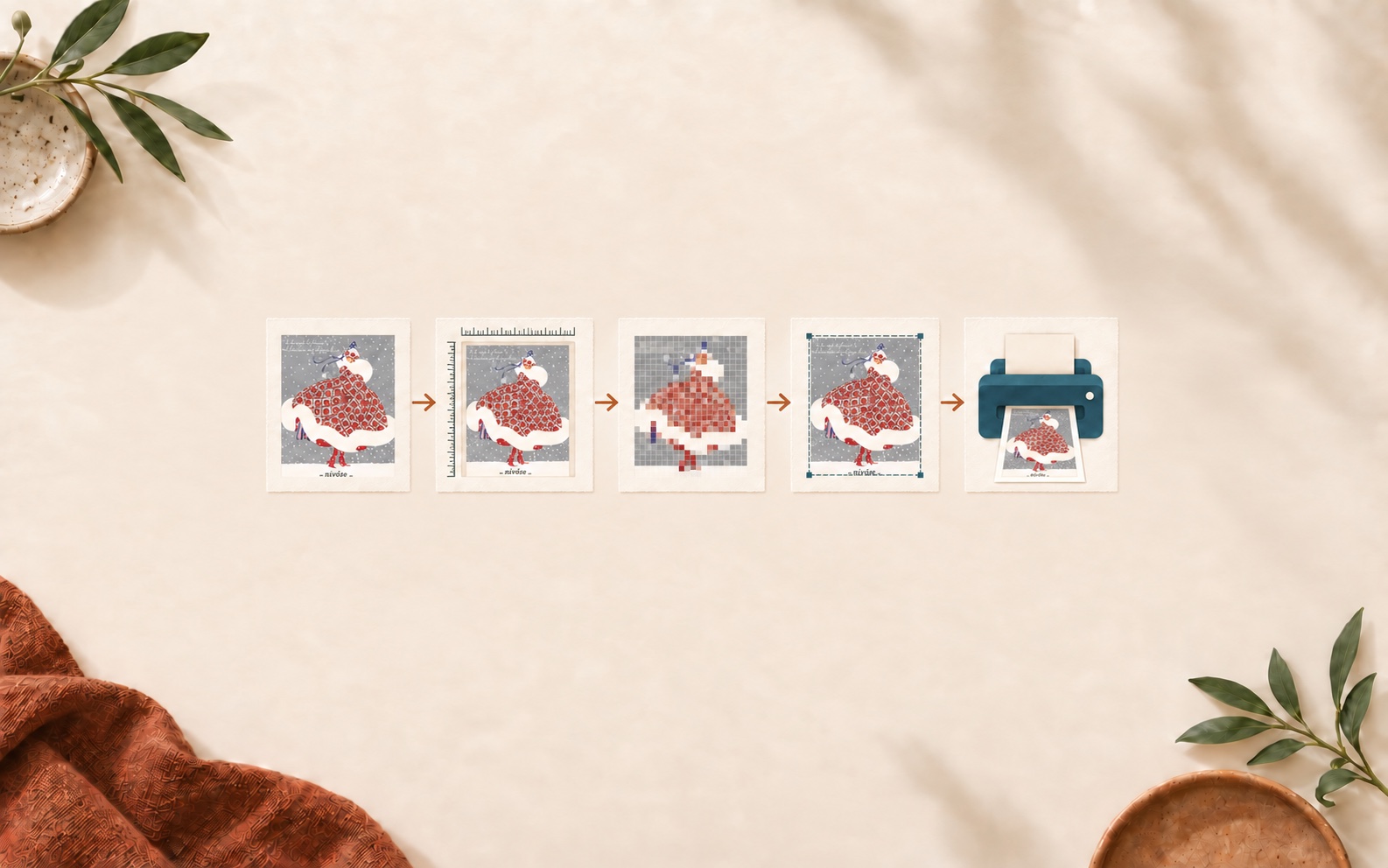
    The same RPS French fashion plate appears through file, size, pixel, crop and printer checks.
    Start with the correct file, then check size, pixels and the intended crop before printing.

    1. Choose the file from the actual package

    Open the download folder and compare the filenames with the product listing. A prepared package may include a master JPG, several ratio families, ISO paper proportions, or a PDF, but the combination varies by product.

    For example, the Bill Traylor Americana digital download currently lists a master JPG plus several square, portrait, landscape, and ISO options. The French Fashion digital download currently lists a broad ratio set and a print-ready PDF. By contrast, the Wyoming Map digital download has a more focused landscape package. Read the listing you purchased instead of borrowing instructions from another artwork.

    2. Write down the finished output size

    Use the visible artwork opening, not only the outside edge of the frame. A mat can change the opening substantially. Record width, height, and orientation before choosing the file.

    If you have not chosen a frame yet, use the printable art aspect-ratio guide before ordering the print.

    3. Match the aspect ratio

    A 12 × 18 inch opening is 2:3. An 8 × 10 inch opening is 4:5. If the file and opening do not share the same proportions, the result needs a deliberate crop or border. Stretching the image changes the artwork and is not a substitute for choosing the right ratio.

    4. Check pixels at the intended size

    Pixel dimensions and intended print size work together. Adobe's printed image resolution guide explains that resolution describes how densely the existing pixels are used when printed; changing the resolution value without resampling does not create new image data.

    Use this transparent calculation:

    pixels ÷ intended inches = pixels per inch (PPI)

    A 2400 × 3000 pixel file printed at 8 × 10 inches uses 300 pixels per inch in both directions. The same file printed at 16 × 20 inches uses 150 pixels per inch. That does not automatically decide whether the print is acceptable—artwork detail, viewing distance, paper, printer, and service requirements also matter—but it tells you what data the file actually contains.

    For a deeper explanation, read what image resolution means for printable art.

    5. Review fit, fill, and crop

    Look at the printer preview at the final paper size. Apple's Preview printing guide distinguishes between printing the entire image and filling the entire paper: filling may crop the image to match the paper proportions.

    • Use a fit or entire-image option when preserving the full composition matters.
    • Use fill only when you have inspected and accepted the displayed crop.
    • Check portrait versus landscape orientation.
    • Decide whether any white border will be trimmed, shown, or covered by a mat.

    6. Send the selected original file

    Upload or transfer the chosen package file directly. Avoid screenshots and messaging-app copies, which can change dimensions or compression. Keep the original download unchanged and make a working copy if you need to rename or test it.

    If you are choosing between home and professional production, compare the tradeoffs in Home Printer or Print Shop?

    7. Give the printer a complete handoff

    Before approving the order, tell the printer or service:

    • the exact finished width and height;
    • the required orientation;
    • whether to preserve the full image or use the crop you approved;
    • whether a border should remain;
    • the paper option you selected; and
    • that you want to review the final crop preview before production.

    Final one-minute check

    • I selected the file from this product's package.
    • I know the visible frame or paper dimensions.
    • The file ratio matches, or I approved the crop or border.
    • I checked the pixel dimensions at the intended output size.
    • The printer preview shows the orientation and full composition I expect.
    • I sent the original selected file, not a screenshot.
    • I reviewed the final proof or crop preview.

    If you are still choosing artwork, browse the digital download collection and compare each listing's included-file section before selecting a frame.

    In this article

    1. Printable art preflight at a glance
    2. 1. Choose the file from the actual package
    3. 2. Write down the finished output size
    4. 3. Match the aspect ratio
    5. 4. Check pixels at the intended size
    6. 5. Review fit, fill, and crop
    7. 6. Send the selected original file
    8. 7. Give the printer a complete handoff
    9. Final one-minute check

    Shop from this guide

    Bill Traylor Americana art | Crouching Man Pointing | Naive folk art | Outsider wall art | African American self-taught artist (whitespace trimmed)
    Paper textures, mat boards, and wood, black, and brass frame samples for digital art

    Digital Download Guides

    How to Choose Paper and Frames for Digital Downloads

    Choose paper, finish, mat, and frame combinations for printable art by considering image detail, contrast, room light, handling, and the intended finished size.

    Read the story

    Ready to choose printable art?

    Browse the Digital Downloads collection or review delivery and printing help.

    Shop digital downloadsOpen the help guideBack to this publication
    Art prints arranged for a boutique retail display

    For independent retailers

    Bring Rock Paper Scissors to your shop

    Explore our wholesale art prints through our branded Faire Direct shop. Browse the collection and review current ordering terms on Faire.

    Shop Rock Paper Scissors on Faire
    Bill Traylor Americana digital download
    French Fashion Digital Download No. 3French Fashion digital download
    • Wyoming Map digital download
    • digital download collection

    Sources

    • printed image resolution guide
    • Preview printing guide

    Related reading

    • printable art aspect-ratio guide
    • what image resolution means for printable art
    • Home Printer or Print Shop?